Monitor and Analyze Statistics in a Review
When a Review is active, the Overview tab displays various statistics. The statistics displayed are dependent on the type of Review.
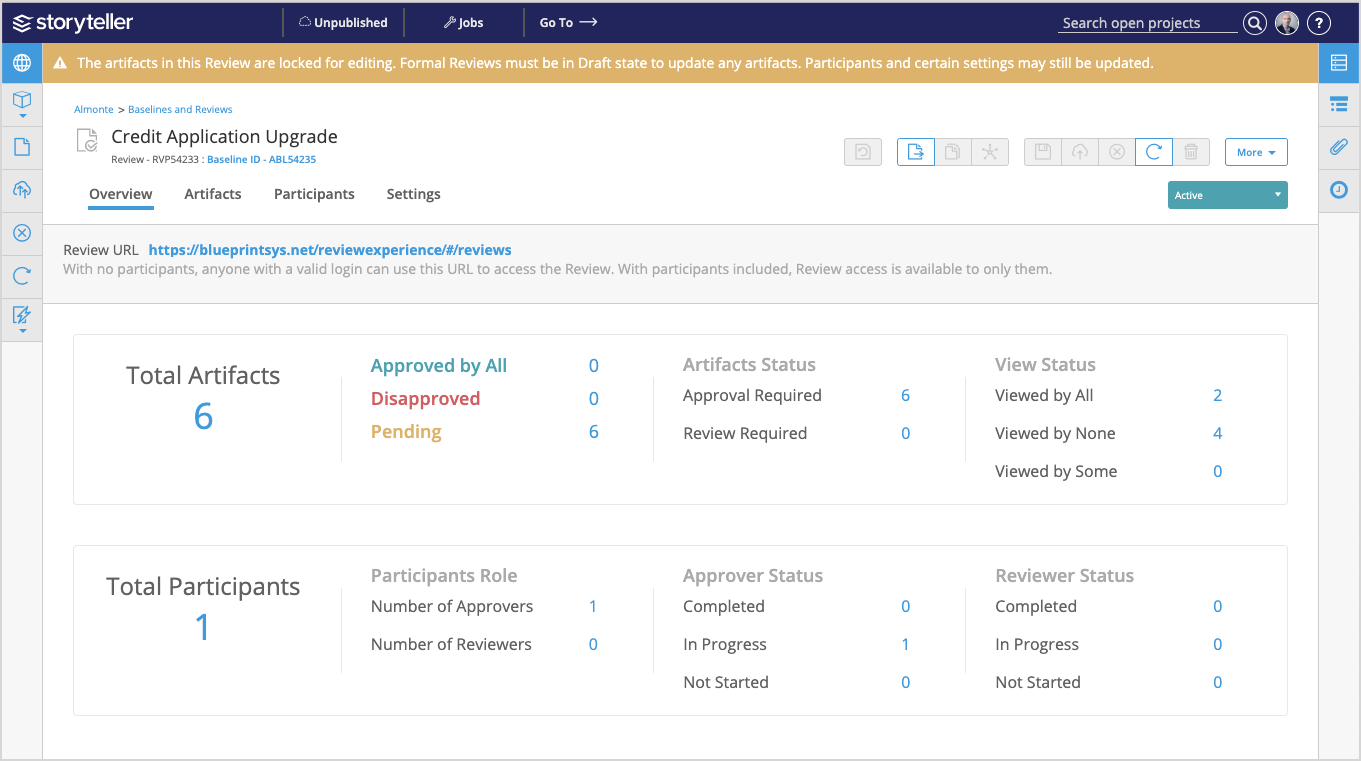
Clicking a metric directs you to its corresponding tab in the Review artifact. Metrics in the first row navigate you to the Artifacts tab and metrics in the second row direct you to the Participants tab.
The following table indicates which metrics are displayed depending on the type of Review that is active:
Statistics | Public | Informal (Private) | Formal (Private) |
|---|---|---|---|
Total Artifacts | ✓ | ✓ | ✓ |
- Approved by All - Disapproved - Pending | x | x | ✓ |
Artifact Status - Approval Required - Review Required | x | ✓ | ✓ |
View Status - Viewed by All - Viewed by None - Viewed by Some | x | ✓ | ✓ |
Total Participants | x | ✓ | ✓ |
Participants Role | x | ✓ | ✓ |
Approver Status - Completed - In Progress - Haven't Started | x | x | ✓ |
Reviewer Status - Completed - In Progress - Haven't Started | x | ✓ | ✓ |
The Disapproved metric is affected if at least one participant has disapproved the artifact.