Impact Analysis Interface
1 min
There are the following three icons located in the top left of the main screen that allow you to customize your Impact Analysis experience:
-
 - The Source icon allows you to change the source (root) of the highest-level artifact in the tree view, by entering its product ID.
-
 - The Filter icon allows you to change the artifact types that are displayed in the tree view. The list of artifact types is displayed based on the project relationships, and is organized by project in the filter menu. Here, you can also choose whether or not you want the artifact’s parents displayed (by default, Show Parents is enabled).
-
 - The Export to Excel icon allows you to export the Impact tree to an Excel document for further analysis. For more information, see Export Artifacts to ExcelExport to Excel.
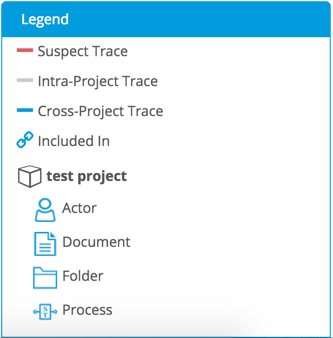
Impact Analysis Legend
The Impact Analysis Legend, located in the bottom-right corner, displays the icon and title of each artifact type that is displayed in the Impact tree.
The artifacts in the Legend are grouped by project. Traces between artifacts can be intra- or cross-project, and suspect traces will also be displayed. These are represented by different colored lines (shown in the Legend). Additionally, any artifact with an Include will be shown with an indicator.