Getting Started with Office Document Template Authoring Tutorial
Blueprint provides users with the ability to export artifacts in a highly customizable format. Before you can export artifacts to a Microsoft Word or Excel document, you must create and add a document template to Blueprint.
Before you can author document templates with ease, it is helpful to have a solid understanding of Blueprint, Microsoft Word/Excel, XML/XPath, and basic programming concepts.
As you create and add more templates to Blueprint, users can export artifacts in a format that meets the needs of your organization.
Blueprint provides a template authoring add-in to simplify the template creation process. After you install the add-in you can customize templates and test them prior to adding the template to Blueprint.
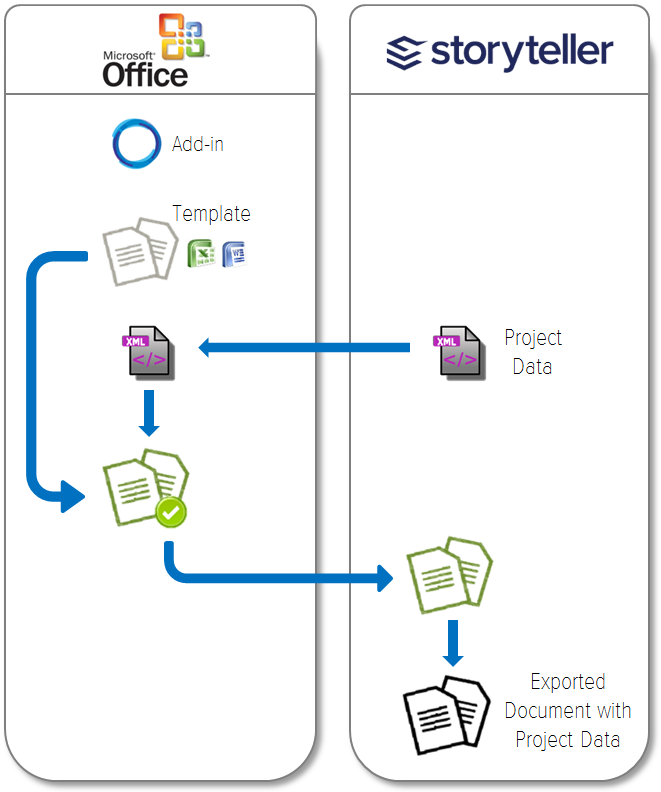
Getting started with Blueprint template authoring involves the following six steps:
- Step 2: Download and open a sample template
- Step 3: Download your Blueprint Project XML Data and Add it as a Data SourceDownload your Blueprint project XML data and add it as a data source
- Step 4: Customize and Test the Document TemplateCustomize and test the template
- Step 5: Add the Document Template to BlueprintAdd the template to Blueprint
- Step 6: Generate a DocumentGenerate a document
The following is a visual representation of the above 6 steps: