Download your Blueprint Project XML Data and Add it as a Data Source
1 min
Your Blueprint project XML data can be used to simplify the document template authoring process. After you have downloaded and added the XML file as a data source, you can access the data as you customize your document template.
You only have to download your Blueprint project XML data once, but you may want to download it more frequently to ensure you are creating a document template using the most up-to-date data.
To download your Blueprint project XML data:
- Log in to your instance of the legacy Blueprint platform.
- Open the project that contains the data that you want to use for authoring your document templates. Template authoring is much easier if you are using actual project data because you can accurately test your template as you customize it.
- Open the Project Admin Console.
- Click Project Details.
- Click the Open link under the Extract Project XML Data heading.
- Save the file.
- Return to the sample template in Microsoft Office.
- Click the Blueprint Manager tab.
- Click Data Sources.
- In the Data Sources modal, click Add.
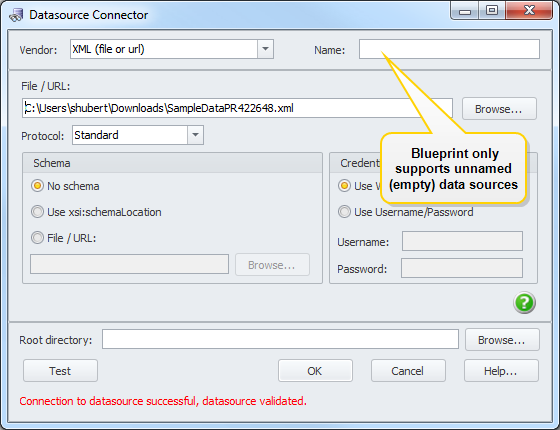
- in the Data Source Connector modal, change the Vendor field to XML (file or url).
- Click Browse and find the .xml file.
- Click the Test button to test the data source.
- Click OK.