GenAI Import Your First Document
NOTE: You can import either Microsoft Word (.docx) or Adobe PDF (.pdf) documents. To be imported, Word documents must have a Table of Contents listing the sections. Table of Contents is not required for PDF documents.
With the configuration complete and a project created using the same template from the AI configuration, you can import documents using the GenAI Import. To complete an import:
- Open your target project
- In the Explorer bar, select more [...] > Import > Import Using GenAI
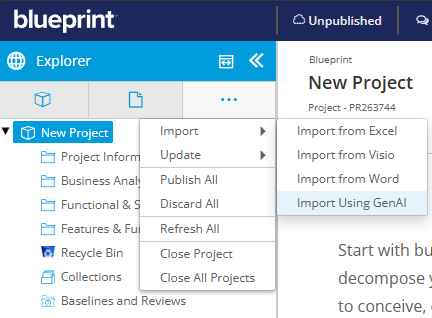
- Choose the document you want to import and then select “Import”
- This will create an import job
- Got to the jobs page to monitor the associated import job until it completes
- Once completed, refresh the main page to see the imported contents
- In the Explorer bar, select more [...] > Refresh All
You should now see your imported requirement artifacts of the types specified in the admin settings in the appropriate folders, traced to each other and with references to the source document. A great way to review the imported artifacts and confirm what was imported is to select the artifact you believe to be the top item in your import and then select "Impact" to open the Impact Analysis view.