Artifact History
2 min
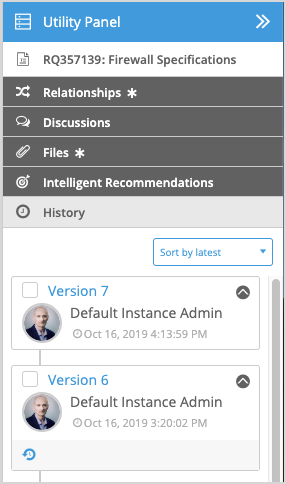
The History tab in the Utility Panel displays a history table with the following information by default:
- Version - The version number of the artifact. Version 1 is always the first version of the artifact. The highest version number is always the most recent. However, keep in mind that you, or another user, may have made changes to the most recent version and not yet published the changes. In this case, a new version appears in the history table after the changes are published.
- Author - Indicates the name of the person who published the version.
- Date - Indicates the date and time the version was published.
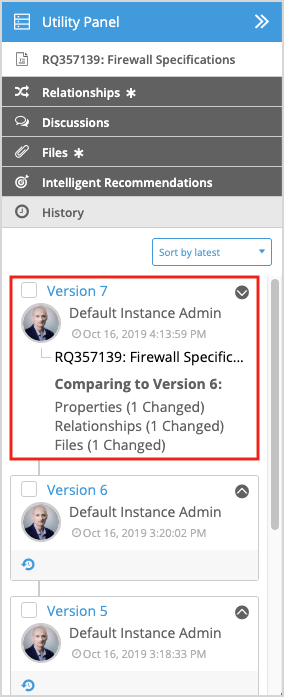
Click the show details icon (
 ) to additionally display the following information:
- Artifact ID and Name - The Artifact ID and name at the time the artifact was published.
- The version the artifact is being compared against; normally the most previous version.
- The total number of properties, relationships, and files that changed compared to the most previous version. The History tab can be sorted according to the latest or earliest version by clicking the sorting toggle at the top of the tab.
The History tab also gives you the ability to revert an artifact to a previous version, restore specific values from a previous version, or perform a version compare. For more information, see Version Compare.