Add a Variable
When you add a variable to a template, you can configure Blueprint to prompt the user to specify values for these parameters when they export artifacts to an Office document.
To add a variable to your template:
- Click the Variable button on the Blueprint Manager tab. The Define Variables window appears:
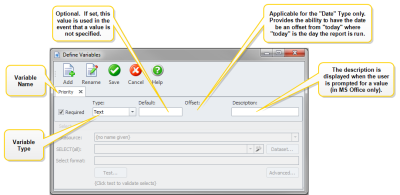
- Click the Add button and type a name for your variable. The variable name is displayed on the tab.
- Type a name for your variable and then press Enter.
The variable name is displayed on the tab.
- Specify the following information about the variable:
Field | Description | Valid Values |
|---|---|---|
Required | Defines whether or not the variable is required or optional to generate output. | To make the variable required, place a checkmark in this box. |
Type | Defines the type of variable. | The Type must be set to one of the following options:
|
Default | Defines the default value. | |
Offset | Provides the ability to have the date be an offset from "today" where "today" is the day the report is run. This field is only applicable when the variable Type is set to Date. | |
Description | The description is displayed when the user is prompted to specify a value when generating output. The description is only displayed when generating output in MS Office. It is not displayed to users who generate documents in Blueprint. | |
COUNT(select) | This select is used to determine how many values would be returned by the all select. If it is greater than 25, then the user will be prompted with a textbox instead of a combo box. This field is only applicable when the variable Type is set to Select. | |
SELECT(all) | Enter a select that will return all distinct values that are valid for this variable. This field is only applicable when the variable Type is set to Select. | |
SELECT(value) | If there are over 25 valid values for this variable, the user will be presented with a textbox instead of a list of values. The user then enters a value in the text box. This field is only applicable when the variable Type is set to Select. | |
- Click Save. Now that you have added a variable to the template, you may want to Use a Variable in your Template.