About Tags
This overview introduces you to the set of tags and illustrates when and why you might use a particular tag when creating document templates.
A Blueprint tag is a place holder for your data. You can add tags to AutoTag in a variety of ways: the Add Tags with the Data Bin, the Add Tags with the Data Tree, and the Add Tags with the Tag Builder. For more information on adding tags in Excel, see Add Tags in Excel.
When the report is run, a tag directs the report to find the data that is supposed to be in the report within the data source, and inserts that information in the document template in the place indicated. The template knows what data to insert based on how the tag is written, and the template knows where to put the data based on the location of the tag in the template. In programming terms, a tag is simply a command applied to the database or other data source.
Available Tags
The following are the tags that are available for your document templates:
Tag Name | Description |
|---|---|
ForEach | Loop through data items (fields) in a dataset |
If | Include part of a report if a condition is met |
Else | Include part of a report if a condition is not met |
Import | Import an external file into the report |
Link | Create a hyperlink to insert hypertext into a report |
Out | Display the contents of a data group or variable |
Query | Create a local variable and set it equivalent to a specified node, for later use in other tags as a relative data reference |
Set | Set a variable in the template |
Switch | Include a different part of a report depending on which condition out of many are true |
Working with Tags
This guide provides information on creating, editing, and deleting tags, as well as anything else you may need to know.
- Tag Tree The tag tree provides a quick look at the tag structure of your template. Every forEach and if tag has the tags inside that tag as a sub-node in the tree so that you can easily see what tags are repeated inside a loop.
- Tag Editor The Tag Editor allows you to create or edit tags.
Types of Tags
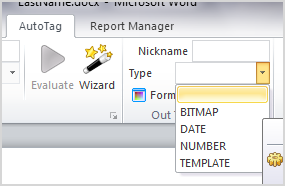
Special options are available for your tags once inserted into the template:
- BITMAP: For images and picture tags must be classified as BITMAPS in order for AutoTag to know an image is to appear there.
- DATE: This will ensure when your tag is a date that is in the correct day month year format.
- NUMBER: For integer tags where numbers should be the outputted data. More options on significant figures can be set as well.
- TEMPLATE: Is for Blueprint Templates, a sub report.
Format Data
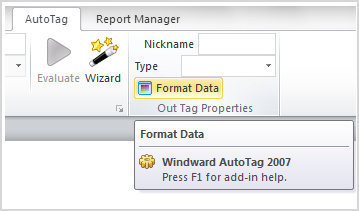
To further classify your data, you can use AutoTags Format Data icon which adds additional changes to your tags specifications. This tool will allow you to format tags with specific times, fractions and layout for more in depth and professional reports. When a tag is selected the Format Data icon will light up and activate.
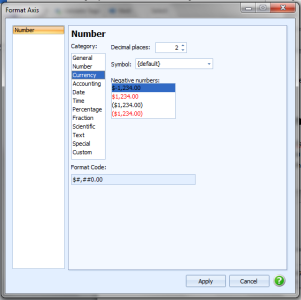
There are many options to better equip your tags for your reporting needs.