REST API - Filter Parameter
The filter parameter allows you to narrow the results that are included in the response to your request. If no filter parameters are specified, all artifacts are returned. If a filter parameter is specified, artifacts are only returned if the artifact matches the specified criteria. The filter parameters can be used individually, or combined to narrow results further.
Syntax
The filter parameter must be specified using the following syntax:
filter={artifact-id eq (‘1’ or ‘2’ or ‘3’);artifact-type eq (‘Actor’);artifact-HasComments eq ‘true’;property-'My prop' eq 1;property-my2prop eq (‘my name’ or ‘your name’)}Method
The filter parameter must be submitted using the REST API - HTTP POST Method.
To submit information using the HTTP POST method, you must add the following information to the request header to override the GET method.
X-HTTP-Method-Override: GETThen, include your filter parameter in the request body. For example:
filter={artifact-type eq (‘UI Mockup');Parameters
- Artifact-Id: If specified, artifacts are only returned if the ID of the artifact matches one of the given IDs.
- Artifact-Type: If specified, artifacts are only returned if the artifact type matches one of the given artifact types.
- Artifact-HasAttachments: If set to true, artifacts are only returned if there is at least one associated attachment. If set to false, artifacts are only returned if there are no associated attachments.
- Artifact-HasComments: If set to true, artifacts are only returned if there is at least one associated comment. If set to false, artifacts are only returned if there are no associated comments.
- Property-[Name]: If specified, artifacts are only returned if the artifact's property value matches the given value.
Supported Operators
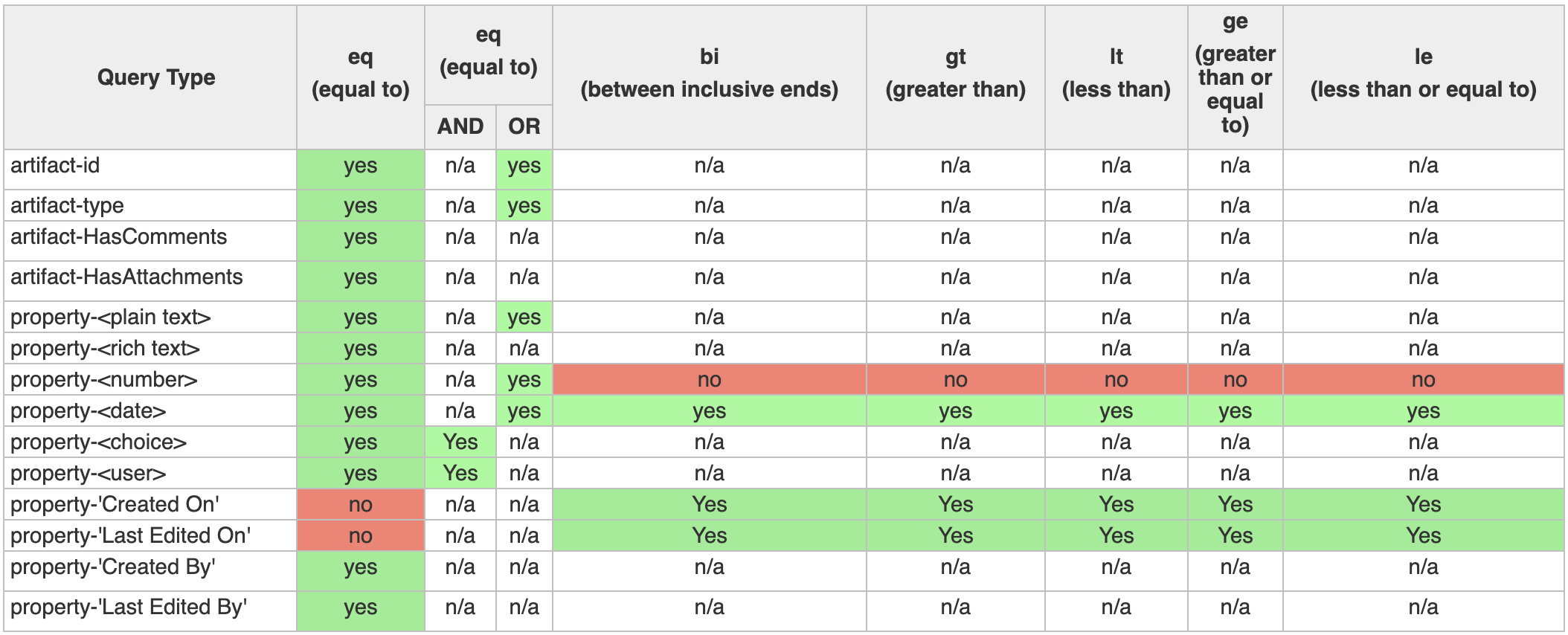
The supported operators varies depending on the data that you want to query. The table below outlines the supported operators for each type of data.
Tips and Important Notes
- Filtering on users and groups:
- When filtering on a user, you must use the user id prepended with the letter 'u'. For example, if the user ID was 20, you need to specify 'u20'.
- When filtering on a group, you must use the group id prepended with the letter 'g'. For example, if the group ID was 18, you need to specify 'g18'.
- Filtering on dates and audit-datetime:
- Dates are measured using just the date (example: '2013-05-11') while Author History fields ('Created On' and 'Last Edited On') are measured using nano-seconds (example: '2013-01-22T16:08:14.2170000Z'). Because of this difference, if you perform a greater than ('gt') filter, the results will be different. For example, a greater than operation on a date will return artifacts that match the following day. Alternatively, a greater than operation on the 'Created By' field will return artifacts after midnight on the same day.
- Filtering on custom properties:
- If you are filtering on custom properties, you must include quotations around the property name if it includes a space. For example: property-'Focus Group'.
Examples
Retrieve all artifacts that have associated comments:
filter={artifact-HasComments eq (‘true’);}Retrieve all artifacts of type 'Actor':
filter={artifact-type eq (‘Actor’);}Retrieve all artifacts of either type 'Actor' or 'Use Case':
filter={artifact-type eq ('Use Case' or 'Actor');}Retrieve all artifacts of type 'Textual Requirement' that have at least one attachment:
filter={artifact-type eq ('Textual Requirement'); artifact-HasAttachments eq ('true');}Retrieve all artifacts where the Priority property of the artifact is set to 'High':
filter={property-priority eq ('High');}Retrieve all artifacts where the Focus Group property of the artifact is equal to a group with an ID of 9 or 10:
filter={property-'Focus Group' eq ('g9' and 'u10')}Retrieve all artifacts that were last edited between midnight on May 11th and midnight on May 14th inclusive:
filter={property-'Last Edited On' bi ('2013-05-11' and '2013-05-14')}Retrieve all artifacts that were created after midnight on May 14th:
filter={property-'Created On' gt ('2013-05-14')}