---
title: REST API - Defining an ALM Job in the Request Body
slug: rm/rest-api-defining-an-alm-job-in-the-request-body
docTags:
createdAt: 2026-06-09T13:38:46.086Z
---
When you are making a request to create an ALM job, you must define the ALM job in the request body.
Two types of jobs can be defined:
- A push to an ALM target
OR
- A change summary for a push to an ALM target.
Initiating a push to an ALM target and initiating a change summary are separate ALM jobs that are a part of the same overarching action: efficiently exporting artifacts to an ALM system. Defining an ALM push sets up the export whereas defining a change summary involves choosing conflict resolutions for the export.
:::hint{type="info"}
You can only define one ALM job in a single request.
:::
# Method
The ALM job must be submitted using the [REST API - HTTP POST Method](docId\:Hsi_LzXS8g_RX_ydUdZKg).
# Parameters
The following parameters must be specified within the `AlmJobParameters` element:
- `AlmJobType`: Identifies the type of ALM job. The ALM job value can either be `AlmExport` or `ChangeSummary`.
- `JobParameters`: If `AlmJobType` equals `ChangeSummary`, you must specify the `ChangeSummaryParameters` value in the `JobParameters` parameter. If `AlmJobType` equals `AlmExport`, you must specify the `AlmExportParameters` value in the `JobParameters` parameter. For more information about the `JobParameters` element, see the following section.
## JobParameters Element
To specify property values for your ALM job, include the `JobParameters `element within the `AlmJobParameters `element. The `JobParameters` element can contain various parameters, including the following:
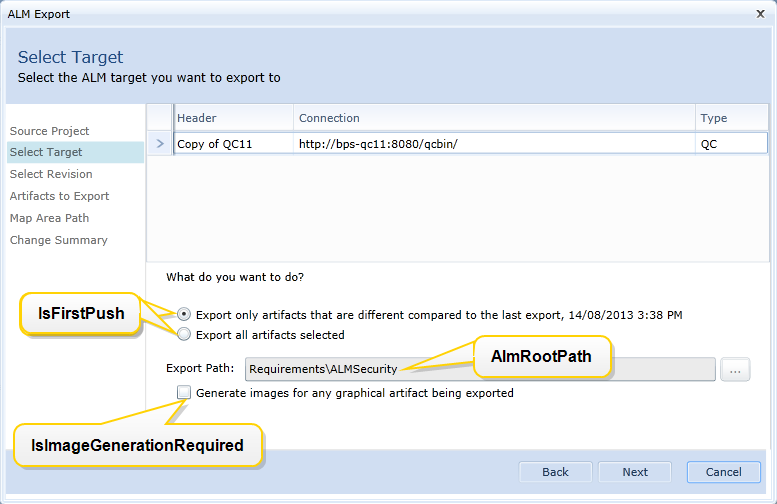
- `AlmRootPath`: Identifies the root path of the project folder which is used as a root for the ALM push. For example: `Enterprise Projects/BP Air`. (*Change summary jobs only.*)
- `AlmRootPathId`: This numerically identifies the folder that is used as a root for the ALM push. Although this parameter is optional, we recommend setting the value if you know ID of the target folder in QC/ALM system. (*Change summary jobs only.*)
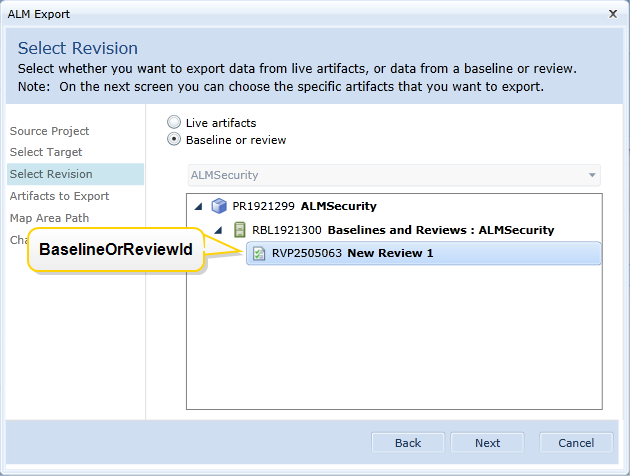
- `BaselineOrReviewId`: Numerically identifies the baseline or review included in the ALM job. (*Required. Change summary jobs only.*)
- `IsFirstPush`: A boolean (`true `or `false`) that identifies whether this is the first push to ALM or not. The default value is `true`. (*Change summary jobs only.*)
- `IsImageGenerationRequired`: A boolean (`true `or `false`) that allows you to specify whether you want images generated for any graphical artifacts in the export. The default value is `true`. (*Change summary jobs only.*)
- `ConflictResolutionRule`: Specifies how you want to resolve any conflicts that could arise when pushing artifacts to the ALM system. Specify the `Override `value if you want any artifacts you are pushing to override identical existing artifacts in the target system. Specify the `Keep `value if you do not want to override the artifacts in the target system. (*Required. ALM export jobs only.*)
- `ChangeSummaryJobId`: Numerically identifies the change summary job. (*Required. ALM export jobs only.*)
The following images show how particular `JobParameters` elements correspond to the ALM Export dialog within Blueprint.
Here is an image of the second screen that appears during an ALM export:
Here is an image of the third screen that appears during an ALM export:
# Examples
## AddALMJob Examples
Here is an example of a request body in XML format:
:::CodeblockTabs
PHP-TEMPLATE
```php
AlmExport Keep 1704
```
:::
Here is an example of a request body in JSON format:
```json
{ "AlmJobType": "AlmExport", "JobParameters": { "Type": "AlmExportParameters", "ConflictResolutionRule": "Keep", "ChangeSummaryJobId": "1704" }}
```
## Change Summary
Here is an example of a request body in XML format:
```xml
ChangeSummary Enterprise Projects/BP Air 16 3506300 true true
```
Here is an example of a request body in JSON format:
```json
{ "AlmJobType": "ChangeSummary", "JobParameters": { "Type": "ChangeSummaryParameters", "IsImageGenerationRequired": false, "IsFirstPush": true, "BaselineOrReviewId": 3506300, "AlmRootPathId": 16, "AlmRootPath": "Enterprise Projects/BP Air" }}
```