REST API - Defining an ALM Job in the Request Body
When you are making a request to create an ALM job, you must define the ALM job in the request body.
Two types of jobs can be defined:
- A push to an ALM target OR
- A change summary for a push to an ALM target. Initiating a push to an ALM target and initiating a change summary are separate ALM jobs that are a part of the same overarching action: efficiently exporting artifacts to an ALM system. Defining an ALM push sets up the export whereas defining a change summary involves choosing conflict resolutions for the export.
You can only define one ALM job in a single request.
Method
The ALM job must be submitted using the REST API - HTTP POST Method.
Parameters
The following parameters must be specified within the AlmJobParameters element:
- AlmJobType: Identifies the type of ALM job. The ALM job value can either be AlmExport or ChangeSummary.
- JobParameters: If AlmJobType equals ChangeSummary, you must specify the ChangeSummaryParameters value in the JobParameters parameter. If AlmJobType equals AlmExport, you must specify the AlmExportParameters value in the JobParameters parameter. For more information about the JobParameters element, see the following section.
JobParameters Element
To specify property values for your ALM job, include the JobParameters element within the AlmJobParameters element. The JobParameters element can contain various parameters, including the following:
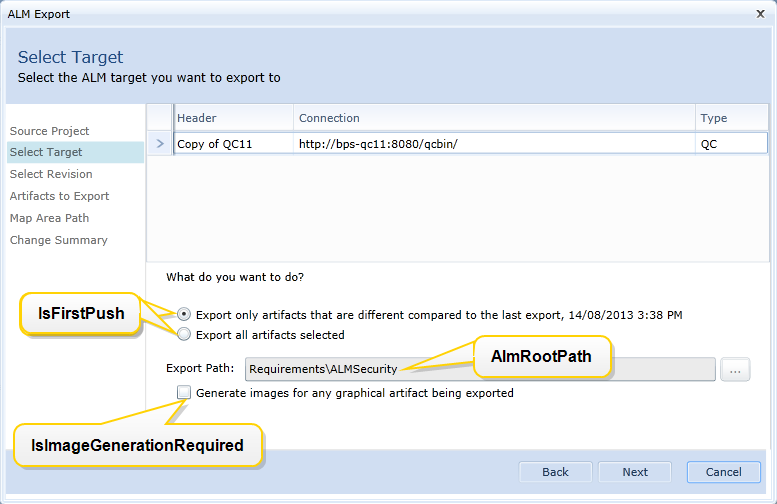
- AlmRootPath: Identifies the root path of the project folder which is used as a root for the ALM push. For example: Enterprise Projects/BP Air. (Change summary jobs only.)
- AlmRootPathId: This numerically identifies the folder that is used as a root for the ALM push. Although this parameter is optional, we recommend setting the value if you know ID of the target folder in QC/ALM system. (Change summary jobs only.)
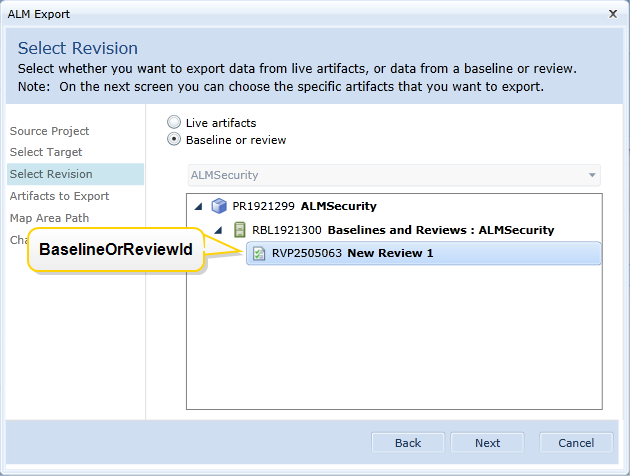
- BaselineOrReviewId: Numerically identifies the baseline or review included in the ALM job. (Required. Change summary jobs only.)
- IsFirstPush: A boolean (true or false) that identifies whether this is the first push to ALM or not. The default value is true. (Change summary jobs only.)
- IsImageGenerationRequired: A boolean (true or false) that allows you to specify whether you want images generated for any graphical artifacts in the export. The default value is true. (Change summary jobs only.)
- ConflictResolutionRule: Specifies how you want to resolve any conflicts that could arise when pushing artifacts to the ALM system. Specify the Override value if you want any artifacts you are pushing to override identical existing artifacts in the target system. Specify the Keep value if you do not want to override the artifacts in the target system. (Required. ALM export jobs only.)
- ChangeSummaryJobId: Numerically identifies the change summary job. (Required. ALM export jobs only.) The following images show how particular JobParameters elements correspond to the ALM Export dialog within Blueprint.
Here is an image of the second screen that appears during an ALM export:
Here is an image of the third screen that appears during an ALM export:
Examples
AddALMJob Examples
Here is an example of a request body in XML format:
<AlmJobParameters xmlns:i="http://www.w3.org/2001/XMLSchema-instance" xmlns="http://www.blueprintsys.com/blueprint/api/v1"> <AlmJobType>AlmExport</AlmJobType> <JobParameters i:type="AlmExportParameters"> <ConflictResolutionRule>Keep</ConflictResolutionRule> <ChangeSummaryJobId>1704</ChangeSummaryJobId> </JobParameters></AlmJobParameters>Here is an example of a request body in JSON format:
{ "AlmJobType": "AlmExport", "JobParameters": { "Type": "AlmExportParameters", "ConflictResolutionRule": "Keep", "ChangeSummaryJobId": "1704" }}Change Summary
Here is an example of a request body in XML format:
<AlmJobParameters xmlns:i="http://www.w3.org/2001/XMLSchema-instance" xmlns="http://www.blueprintsys.com/blueprint/api/v1"> <AlmJobType>ChangeSummary</AlmJobType> <JobParameters i:type="ChangeSummaryParameters"> <AlmRootPath>Enterprise Projects/BP Air</AlmRootPath> <AlmRootPathId>16</AlmRootPathId> <BaselineOrReviewId>3506300</BaselineOrReviewId> <IsFirstPush>true</IsFirstPush> <IsImageGenerationRequired>true</IsImageGenerationRequired> </JobParameters></AlmJobParameters>Here is an example of a request body in JSON format:
{ "AlmJobType": "ChangeSummary", "JobParameters": { "Type": "ChangeSummaryParameters", "IsImageGenerationRequired": false, "IsFirstPush": true, "BaselineOrReviewId": 3506300, "AlmRootPathId": 16, "AlmRootPath": "Enterprise Projects/BP Air" }}