Document Template Options and Parameters
You can set AutoTag's options to control how tags are read and how they display in your document template. To set these options, select the Options icon from the Options menu.
We recommend that you use the default settings in the Options dialog.
Standard Options
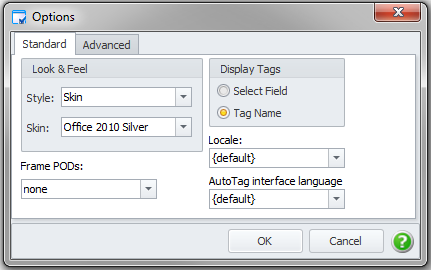
The Standard tab in the Options dialog allows you to change the look and feel, change whether tag names or select fields are displayed, and set the default locale.
Advanced Options
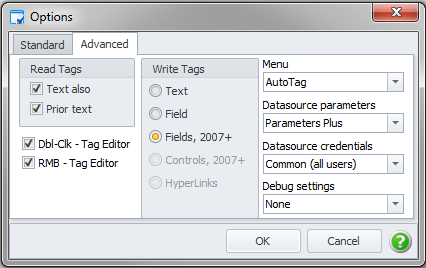
The Advanced tab in the Options dialog allows you to change whether tags are written as fields (Word only) or as text, change how tags are read by AutoTag, and change the menu profile.
The Design menu profile shows all of the standard AutoTag icons. The UDT only menu profile removes the Data Bin, Tag Builder and Edit Tag icons.
Read Tags Pane
If you have Text tags in your template, you must select the Text also option. You may also need to select the Prior text option. If you only use templates containing Office2007+ and/or Field tags, turn off both of these options.
- Select Text also so AutoTag evaluates any Text tags in your template as well as the Field tags. This setting will cause a minor impact on your system's performance.
- Select Prior text to scan the template (up to the current position of the cursor) to check for Text tags as well as Field tags. This scan occurs each time the Tag Editor opens or validation is run, and may cause a noticeable impact on your system's performance.
Dbl-Clk - Tag Editor
If selected (the default) then double-clicking on a tag will bring up the tag editor. If it is not selected then double-clicking on a tag will operate in the standard way for Office. You need to restart Office after changing this.
RMB - Tag Editor
If selected (the default) then pressing the right mouse button for the context menu will include several AutoTag commands at the bottom of the menu. If it is not selected then the context menu will have nothing added. You need to restart Office after changing this.
Write Tags
We recommend that you use the default setting, which is the Fields, 2007+ option.
Menu
We recommend that you use the default setting, which is the AutoTag option.
Defines the menu mode to use, which allows you to control which items are displayed in the Blueprint and Blueprint Manager tabs.
Datasource Parameters
We recommend that you use the default setting, which is the Parameters Plus option.
Datasource Credentials
We recommend that you use the default setting, which is the Parameters Plus option.
Debug Settings
Only turn this on if instructed to do so by the technical support team.