Copy Artifacts
If you’re reusing requirements or know you'll have very similar requirements, you can copy an artifact (and modify it if needed). When you copy an artifact, the new copy will have a different ID from the original artifact.
Artifacts can always be copied within the same project, but can also be copied to another project using the Copy Artifact button in the artifact toolbar.
To copy an artifact in this manner:
- In the Explorer, select the artifact you want to move.
- Click the Copy Artifact button (
 ) in the artifact toolbar.
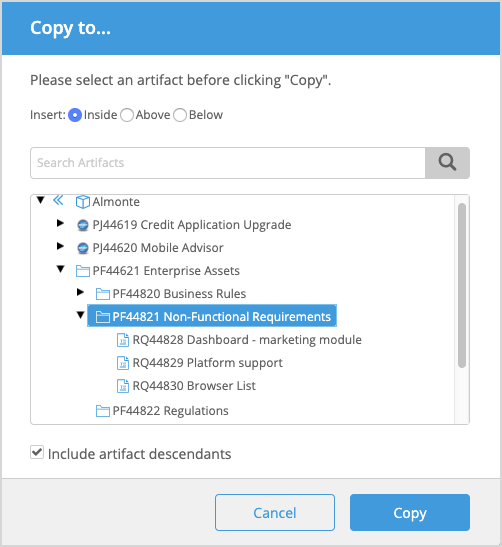
- In the Copy to... modal, navigate to where you want the artifact to be copied. If the destination is within the same project, find the exact location within the hierarchy. If you want the destination to be another project, and the artifact is a standard type, click the "back" indicator next to the root of the current project to display all projects in the instance that you have access to. Then, find the exact location within the hierarchy.
- Choose if you would like to insert the artifact Inside, Above, or Below another artifact.
- Select whether to include the selected artifact’s children and descendants with the copy.
- Click Copy.
- If the destination project is open, the copied artifacts are highlighted in the Explorer. They will still need to be published.
The following table highlights which artifacts can be copied within the same project or across projects:
Artifact type | Can be copied within the same project | Can be copied across projects |
|---|---|---|
Standard artifact type | Yes | Yes |
Custom artifact type | Yes | No (Including any child artifacts, if the Include artifact descendents option is selected) |
Reviews | No | No |
Baselines | No | No |
The following table indicates which artifacts properties are retained when an artifact is copied:
Artifact Property | Within the same project | Across projects |
|---|---|---|
Artifact ID | Not preserved | Not preserved |
Relationships | Traces are not preserved | - Traces are preserved only if both trace points are present in the destination project - Parent-child relationships are not retained - Some types of relationships, such as the one-to-one requirement for Actor inheritance, may not be retained with multiple copies |
Discussions | Not preserved | Not preserved |
Attachments | Preserved | Preserved — copied to the destination project |
Document references | Preserved | Preserved — if found in the destination project, refers there; if not found, refers to the originating project |
History | Not preserved | Not preserved |