Add Glossary Terms
3 min
There are two ways to add a term to a glossary:
- Directly in the Glossary artifact
- From any rich text property in an artifact
Add a Term Directly in the Glossary Artifact
To add a term to a glossary in the Glossary artifact:
- In the Glossary artifact you want to add a term to, click Add term.
- Click the edit icon (
 ) in the field and enter the term.
- Click the edit icon (
 ) in the Definition field and enter the definition.
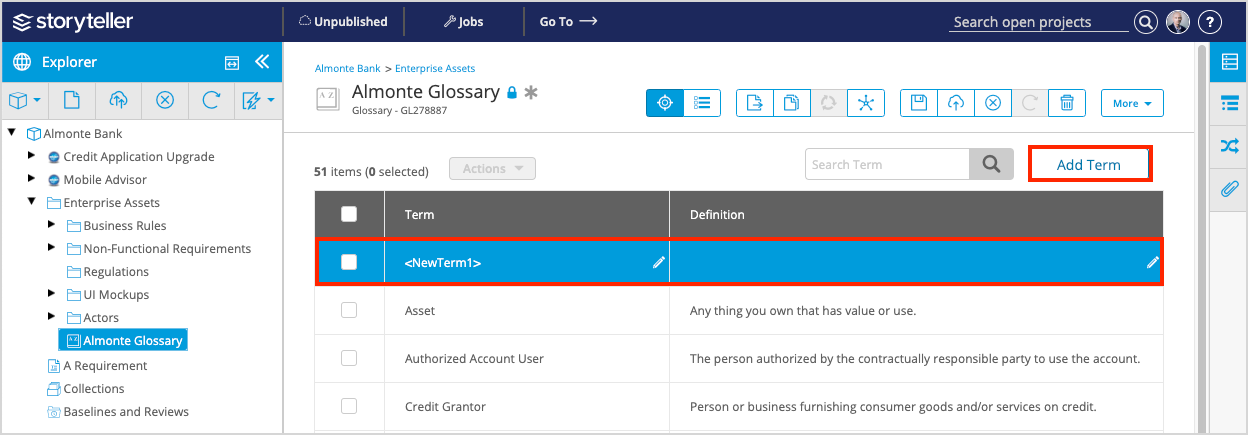
- Save (
 ) and publish (
 ) your changes for your Glossary artifact by clicking the save and publish icons in the artifact toolbar.
Add a Term to a Glossary from a Rich Text Field
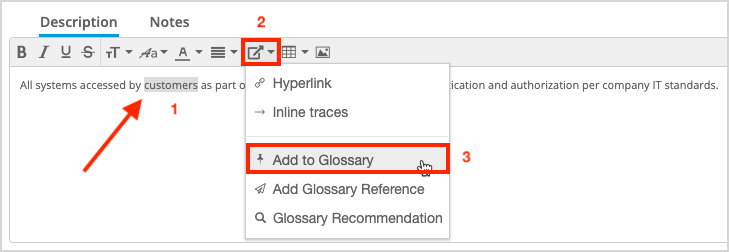
To add a term to a glossary from a rich text property:
- Highlight the text you want to create a new glossary term for.
- Click the Links menu (
 ) in the rich text control and select Add to Glossary.
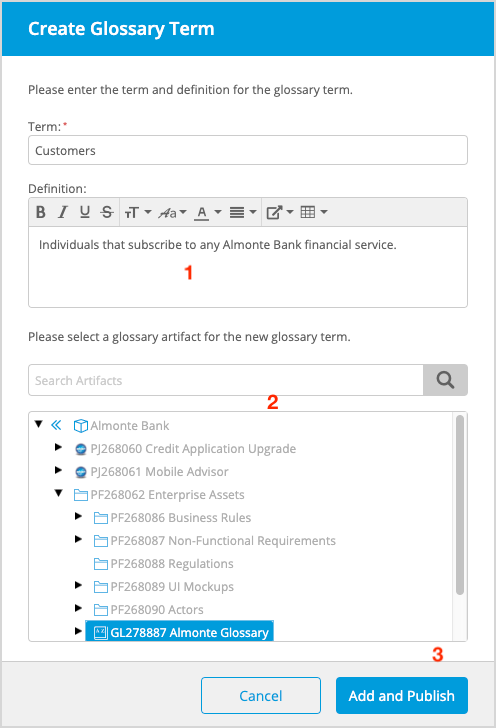
- In the Create Glossary Term modal displayed:
- The Term field is already populated with the term that was highlighted.
- Enter the definition for the term. This field is optional.
- Select the Glossary artifact you want to add the term to. You can also search for the Glossary artifact of interest using the search bar.
- Click Add and Publish.
- Once published, the term in the rich property field becomes a Glossary Reference.